By Susan Akello ; Luminous writer.
In today’s digital world, smartphones have become essential tools for communication, business, education, and entertainment. At the heart of every Android device lies the Google Play Store—a powerful platform that allows users to download, install, and manage millions of apps with ease. Whether you’re looking for productivity tools, games, or educational resources, it is your gateway to a universe of possibilities.
This comprehensive guide explores everything you need to know about it —from how it works to tips for safe and efficient app installation
What Is Google Play Store?
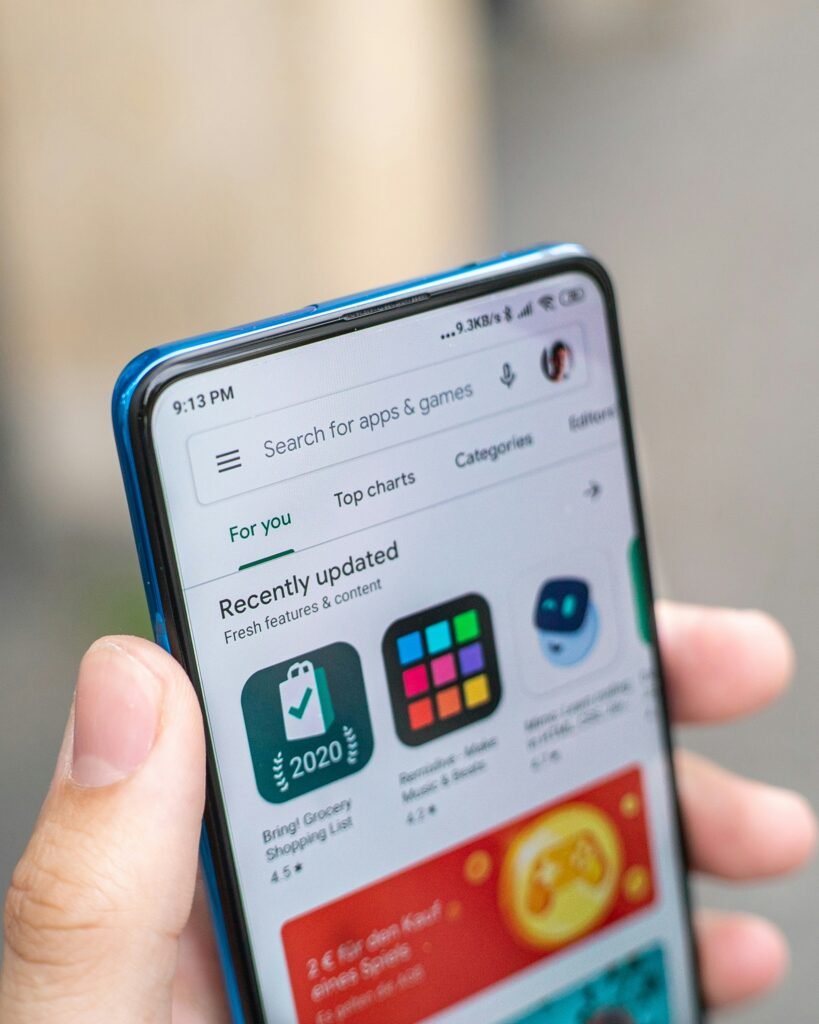
The Google Play Store is the official app distribution platform developed by Google for Android devices. It serves as a centralized hub where users can browse, download, and update applications, games, movies, books, and more.
Originally launched as Android Market, the platform was rebranded to Google Play in 2012. Since then, it has evolved into one of the largest digital marketplaces in the world, hosting millions of apps across various categories
Why Google Play Store Download Matters
Downloading apps from the Google Play Store offers several key benefits:
1. Security and Reliability
Apps on the Play Store are scanned using Google Play Protect, which helps detect malware and harmful software. This ensures that users download safe and verified applications.
2. Easy Access to Millions of Apps
From social media platforms to financial tools, the Play Store offers apps for nearly every need. Popular apps like WhatsApp, Facebook, and TikTok are just a tap away.
3. Automatic Updates
The Play Store allows apps to update automatically, ensuring you always have the latest features and security improvements.
4. User Reviews and Ratings
Before downloading an app, you can check reviews and ratings from other users, helping you make informed decisions.
How to Download Apps from Google Play Store
Downloading apps from the Play Store is simple and user-friendly. Follow these steps:
Step 1: Open the Play Store
Locate and tap the Google Play Store icon on your Android device.
Step 2: Search for an App
Use the search bar to type the name of the app you want to download.
Step 3: Select the App
Tap on the app from the search results to view its details, including description, ratings, and screenshots.
Step 4: Tap “Install”
Click the “Install” button. The app will begin downloading and installing automatically.
Step 5: Open the App(Google Play Store Download).
Once installed, tap “Open” or find the app on your home screen
How to Download Google Play Store (If Missing)
In rare cases, your device may not have the Play Store installed. This can happen with some custom Android devices or after system issues.
Steps to Install Google Play Store Manually:
- Enable “Unknown Sources” in your device settings.
- Download the Play Store APK from a trusted website.
- Install the APK file.
- Restart your device and sign in with your Google account.
Note: Always ensure you download APK files from reliable sources to avoid security risks.
Features of Google Play Store
1. Personalized Recommendations
The Play Store uses AI to recommend apps based on your interests and usage patterns.
2. Multiple Content Types
Beyond apps, you can access movies, books, and music through services like Google Play Movies & TV and Google Play Books.
3. Family-Friendly Controls
Parents can manage what their children download using parental controls.
4. Offline Installation Support
Some apps can be shared and installed offline using nearby sharing features.
Tips for Safe Google Play Store Download
While the Play Store is secure, it’s still important to follow best practices:
1. Check App Permissions
Always review the permissions an app requests before installing.
2. Read Reviews Carefully
Look for consistent feedback about bugs or suspicious behavior.
3. Verify Developer Information
Trusted developers usually have a strong presence and multiple apps.
4. Avoid Fake Apps
Be cautious of apps that mimic popular ones like Instagram or YouTube.
Common Issues and How to Fix Them(Google Play Store Download).
1. Play Store Not Opening
- Clear cache and data
- Restart your device
- Update the Play Store app
2. Download Stuck or Pending
- Check your internet connection
- Clear download queue
- Restart the device
3. Insufficient Storage
- Delete unused apps
- Clear media files
- Use cloud storage services
Google Play Store vs Other App Stores
Although the Play Store dominates Android devices, there are alternatives:
- Amazon App store
- Samsung Galaxy Store
However, the Google Play Store remains the most trusted and widely used platform due to its vast selection and security features. You can purchase Google Play store App. with ease from Amazon App Store from here . And below there’s a more detailed information about the Google Play Store App. from Amazon Website:
Install Google Play on Kindle Fire : Complete and easy guide to setup and install Google Play Store on Kindle Fire
A complete and easy guide to setup and install Google Play Store on Kindle Fire.
So you have an amazing kindle tablet but it only uses Amazon app store and now you want something more from it and you don’t know how to do it.
Well, don’t worry about it. Now you can install google play store in your kindle tablet and enjoy all the apps you wanted to install on it.
The book contains very easy steps and links to help you and guide you in installing Google Play on your device
Main Contents of the book are:
- What is Kindle Fire
- What is Google Play Store
- Why am I need of it
- Downloading Google Play Store Apk files
- Install Apk files
- Using the play store
Product features
- Check App Updates Instantly – Quickly find pending updates for installed apps.
- Play Store & Play Services Info – View version details and update status.
- System App Version Tracker – See core system app versions in one place.
- Update Notifications – Get alerts when new updates are available.
- One-Tap Update Checker – Simple and fast update scanning.
- Detailed App Info – View package name, version code, and install date.
- Update History Log – Track past updates for apps and services.
- Lightweight & Fast – Minimal storage usage and quick performance
Benefits for Developers
The Play Store is not just beneficial for users—it’s also a powerful platform for developers.
1. Global Reach
Developers can distribute apps worldwide.
2. Monetization Options
Apps can generate revenue through ads, subscriptions, and in-app purchases.
3. Analytics and Insights
Developers get detailed performance data to improve their apps.
The Role of Google Play Store in Everyday Life
The Google Play Store has transformed how people interact with technology. From mobile banking to online education, it enables users to perform essential tasks directly from their smartphones.
In countries like Uganda, the Play Store plays a vital role in digital transformation by providing access to apps for communication, finance, agriculture, and healthcare
Future of Google Play Store
As technology evolves, the Play Store continues to improve with features like:
- AI-powered recommendations
- Enhanced security measures
- Better app discovery tools
- Integration with wearable and smart devices
With advancements in artificial intelligence and cloud computing, the Play Store is expected to become even more personalized and efficient. You can explore more Google services offered here.
Conclusion
The Google Play Store is an essential tool for every Android user. It provides a safe, reliable, and convenient way to download apps and digital content. Whether you’re installing your favorite social media app or discovering new tools to boost productivity, the Play Store simplifies the process.
By following best practices for safe downloads and staying informed about its features, you can make the most of this powerful platform. As the digital landscape continues to evolve, the Google Play Store will remain at the forefront, connecting users to the apps and services that shape modern life